Local SEO helps nearby customers find your business in Google Search and Maps. Start by verifying and updating your Google Business Profile, then make sure your website explains what you do, where you work and how to get in touch. Ask customers for honest reviews and measure enquiries you can serve alongside profile views and clicks.
Make your Google Business Profile accurate
Start by finding and verifying the profile for the business. Make sure the business name matches how you trade. Choose a primary category that describes your main work and use additional categories only where they fit. Add a current website and phone number, update the opening hours and set holiday hours when they differ.
Use photographs that help someone recognise the location or understand what you offer. A picture of the entrance is useful for a shop with a hard-to-find door. A repair business can show real examples of work and explain what was done. Give the profile a clear route to book or enquire, and check the link as a customer would on a phone.
Choose the profile setup that matches how you serve customers. Check Google’s Business Profile guidelines and its service-area instructions before changing the listed address.
How you serve customers | Profile setup | Useful details to add |
|---|---|---|
Customers visit a staffed shop or office | Storefront. Show the address where customers can visit | Opening hours, entrance photo and directions |
You visit customers and have no premises they can visit | Service-area business. Hide your address and list the places you serve | Postcode coverage and which jobs you take |
Customers visit your premises and you also travel to them | Hybrid. Show the eligible address and add your service area | In-store hours and how to arrange a visit |
Build a website that answers local questions
A strong service page tells someone what you do, who you do it for and where you cover. Give it a clear title and describe the jobs you regularly take on. Bring real details into the page. For example, a gardener might explain which projects can be quoted from photographs and when a site visit is needed. That sets a sensible expectation for the next step.
Use contact details consistently across the website and profile. Make enquiry and booking links easy to find on a phone. If the customer needs a postcode, date or photograph, say so before they fill in the form. Our plumbing website examples show how service coverage and a clear call or quote route can work together.
Create a dedicated page for an area when you have something meaningful to say about working there. That might be a locally relevant service, a genuine location, different opening hours or examples with permission. If the same description suits all neighbouring towns, a clear coverage section on the main service page may be easier for customers to use and for you to keep up to date.
How Elkwood made The Dog Wood easier to find
The Dog Wood is a private dog-walking woodland in Bosham, West Sussex. On the website Elkwood built, visitors can see the street address and postcode, open the location in Google Maps and find out what to expect on arrival. This is part of the public site ahead of opening.
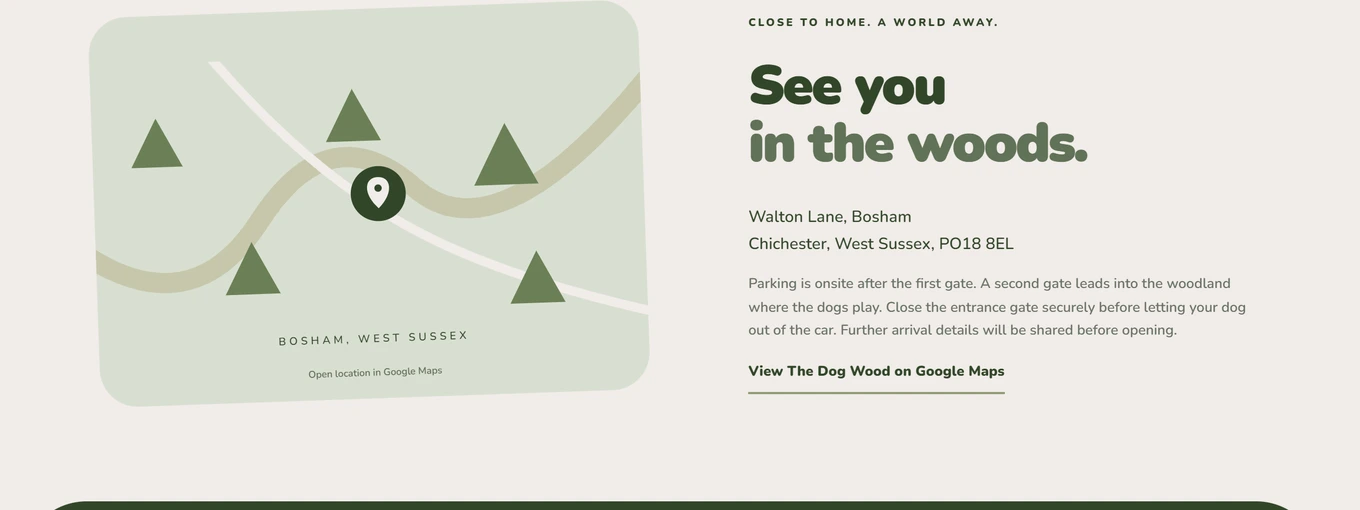
The page explains that parking is after the first gate and the woodland starts beyond the second. That detail answers a question the postcode alone can’t. For a business customers visit, check the address and map pin against the entrance people actually use, then add the arrival details they’ll need. A mobile business can do the same for its service area by explaining which postcodes it covers and what customers need to provide when booking.
Ask for reviews as part of the handover
Choose a natural moment to ask for feedback, such as a completed job or a customer collecting an order. Keep the request short and make the review link straightforward. Ask customers for their honest experience. Build the request into a repeatable handover so it reaches a representative mix of customers.
Respond to reviews in a helpful way and keep customer information private. If a problem needs a discussion, offer an appropriate contact route. Look for themes across reviews. If people keep mentioning good communication, show where that comes from on your site. If they keep asking about access or parking, improve the directions and contact page.
Know what changes can influence visibility
Google’s guidance on local ranking describes relevance, distance and prominence. Complete business information helps people and search engines judge relevance. Distance depends on where the person is searching, and your reputation and visibility are built over time. Search for your services from a few relevant points and look for patterns across the area you serve.
Correct details in places real customers use, such as relevant trade directories and local business listings. Give priority to listings that help customers find you, confirm your details or reach your website. Links and mentions from genuine partners, local organisations and professional bodies can make it easier for people to discover you. Concentrate on relationships that make sense for the business.
Measure enquiries as well as search visibility
Record the starting position before making changes. Check which Profile actions people use and what search queries bring visits to your website. Look at service pages that receive visits but generate few enquiries. Read those pages on a phone and see whether the next step is clear and the form works. Check whether customer messages mention a specific service or area.
Google’s Business Profile performance guide defines calls as clicks on the call button. Count confirmed enquiries separately. For example, if the profile records 12 call clicks and your team logs seven confirmed enquiries, of which three are in your service area, those three tell you how many opportunities the team could actually take on.
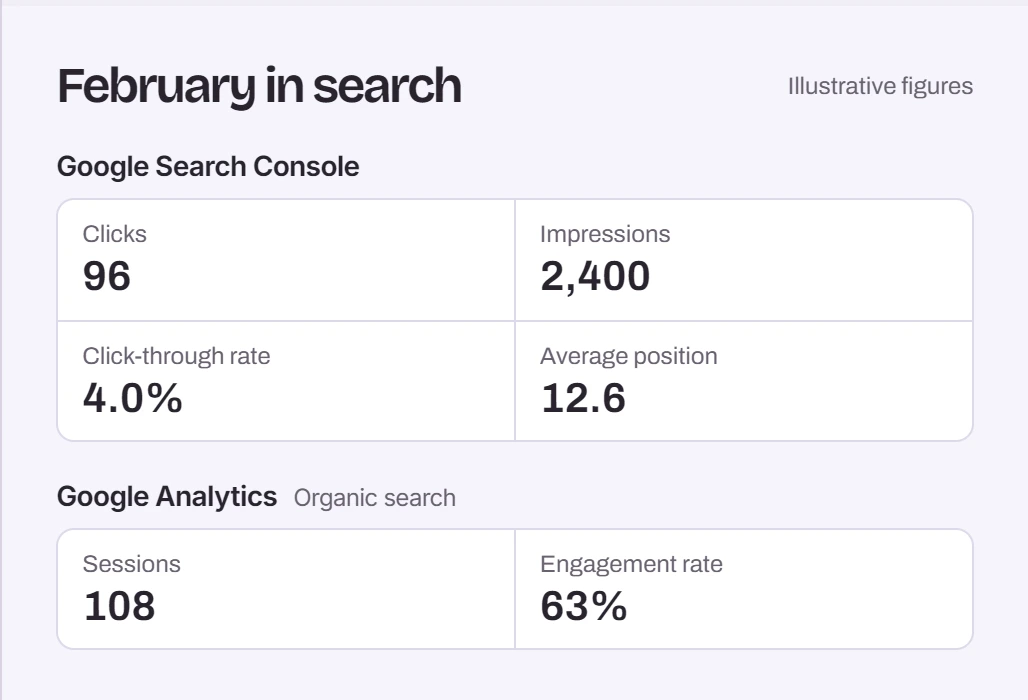
Elkwood’s sample Local Visibility report shows how to read website search data alongside those enquiries. In the example below, 96 clicks from 2,400 impressions gives a 4% click-through rate. Look at which pages and queries account for the clicks, then compare them with the jobs customers actually ask you to do.
Make a practical first-month plan
In week one, verify the profile, correct the details and test contact links. In week two, improve the two service pages most relevant to customers nearby. In week three, introduce a regular review request and check the local listings customers use. At the end of the month, see what questions and enquiries have changed and choose the next thing to improve.
A new address, seasonal hours or a different service area can undo earlier work if your profile and website get out of sync. Give one person responsibility for updating both. A short monthly review can catch outdated information and help you choose the next useful change.
Record which pages and profile details were changed and when. A simple dated note lets you connect a shift in enquiries to the work you did and spot seasonal changes over time.
Get help with Local Visibility
Elkwood Studios offers Local Visibility for small businesses that want help with their Google Business Profile and how customers find them locally. Tell us your main service, the area you cover and whether your profile is already verified. You can use the form below to ask about the service and we’ll reply by email.
If customers often call just to find a free time, see our online booking guide for ways to make that step easier.